Bought an Acer Aspire Timeline X notebook? Tried to re-install Windows 7? And your network / wireless driver installation fails?
When re-installing Windows from scratch, your second step is to download drivers from Acer’s support area. However, you will find out that
- there are multiple drivers from different vendors for each device
- Acer’s notebook package does not ship with detailed device specifications
- all Wireless LAN drivers provided by Acer fail to install
Analyze
First of all, contrary to many other forum posts and bad advices on the net, there’s no need to download or install any third-party drivers. The drivers provided by Acer are sufficient, but need some heavy tricks to make them work.
Second, you may want to download and execute Acer’s hardware vendor detection utility to figure out which drivers to install in general:
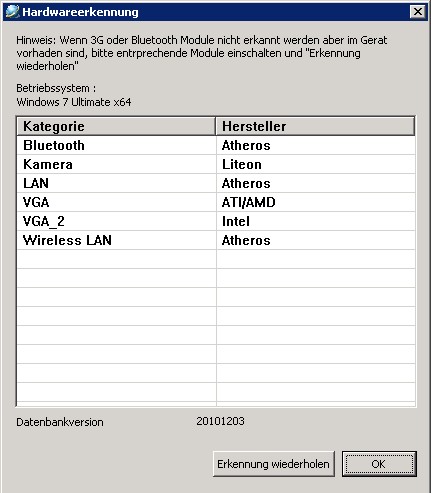
Third, turn your notebook upside down to figure out the actual Wireless LAN and Bluetooth devices of your notebook:

Before you try
- Uninstall all wireless/bluetooth drivers, if you installed any.
- Install the (system and DVD RAM) power management and (Dritek) Launch manager applications available in Acer’s download section for your notebook.
- Reboot.
- Make sure that wireless LAN and Bluetooth devices are enabled via Launch manager.
Wireless LAN driver installation
Given that information,
- Extract the corresponding driver archive downloaded from Acer
- Go to the Device Manager
- Right-click the yet unknown Network controller
- Select Update driver software…
- Choose Browse my computer for driver software
- Choose Let me pick from a list of device drivers on my computer
- Press the Have disk… button
- Browse to the folder containing the extracted driver, which should contain a sub-directory holding .inf files and select an appropriate .inf file.
- In case of an Atheros (AR5B97) device, you’ll find netathr.inf and netathrx.inf. When comparing both files, then the first is for the x86 architecture, the latter (with x) is for the amd64 architecture. Acer supplies Intel, so choose the first.
- Based on the information on the sticker (see picture above), find and select the corresponding entry in the device driver list, and confirm the Windows driver installation warning.
- Profit.
Update [2011-03-03]:
The above worked fine for a few days, but at some point, Windows 7 decided to mark the Acer Atheros AR5B97 driver as invalid, disabling the device. Re-installing the device and driver did not help. Since neither Acer nor Atheros are providing up to date official driver downloads, you need to go on and install a driver from a unofficial driver source.
Warning: Never ever download or install drivers from driver download scam sites. These driver download sites most often appear high in search results, and they provide you malicious .EXE files, suggesting to scan your computer for devices… don’t download or install them.
- In case of Atheros, find the driver for your operating system on the unofficial Atheros driver download site.
- Do not click on any of the (bigger) Start download or Download here links at the top or in the sidebar; these are ads from ugly spam/scam sites.
- For extra safety, you can additionally download the same version of the driver that Acer provided from there, and use a file comparison tool of your choice to ensure that both driver packages contain the same files. Of course, that says nada about the validity of the newer driver, but unless you understand Windows driver internals, that’s about all you can do.
- Extract the downloaded driver archive into a directory.
- Go to the Device Manager
- Right-click the yet unknown Network controller
- Select Update driver software…
- Choose Browse my computer for driver software
- Browse to the directory you extracted the files into
- Hit Next
- Confirm the driver installation even though the driver is not signed
- Profit.
Apparently, Windows 7 detects this new driver version as compatible, so you don’t need to search manually for the driver files and force an installation.
Bluetooth (3.0) driver installation
Upfront: The device information on the sticker buys you nothing.
- Install the Atheros Bluetooth 3.0 drivers. When it asks to reboot, do reboot.
- Go to the Device Manager
- Right-click the Generic Bluetooth device that Windows automatically disabled
- Select Update driver software…
- Choose Browse my computer for driver software
- Choose Let me pick from a list of device drivers on my computer
- Press the Have disk… button
- Browse to the installation directory of the Bluetooth drivers/application, and navigate to the sub-folder named “drivers”, which should contain a flood of .inf files. Select the first one.
- Forget about your actual device information, just find and select the entry named Atheros AR3011 Bluetooth 3.o (or similar), and confirm the Windows driver installation warning.
- After installing the driver, Windows should suddenly start recognize 3-4 further devices and install them automatically.
- Profit.
Comments
4 responses to “Acer wireless driver installation”
Thank you! I’ve been trying to get this to work for days to no avail… I’ve lost count of the number of times I’ve installed the Acer drivers foolishly expecting them to work.
This worked first time for me, thanks again, so much appreciated!
Thank you so much!!!
have been dealing with no wifi for a couple of weeks now, no help from anywhere.
Thank you again!!
very helpful, but mine’s got one more problem. It doesn’t detect the wifi and the wifi light on my laptop doesnt turn on. can you help me?
Your instructions were so goooood! My gf asked after I got it wifi working…how do you do it… Isaid i just read instructions…the real question is ..how do you do it? Thank you, I tried to install the same drivers but until I followed your instructions nothing worked. William in Vancouver